Showing posts with label Related Articles FaceBook. Show all posts
Hacking Facebook Password | Facebook Freezer
Sunday, January 24, 2010

Of several ways to do Hacking Facebook; ranging from technical or login page that is by imitating pishing website facebook interface that has been modified so that they can transmit account and password into the web hosting one poster, using the script or by using coarse keyloger or norton antivirus which supports to record keyboard activity, so as to know the user and the user account or a laptop computer, of course without the user realizing it lapotop.
But here Articles Computer just wanted to share a mini tools, which can make owners facebook account password reset.
It's easy, because it's so easy anyone can use it, and as far as Computer article yet there are ways to overcome it (the impact of this application), [maybe later ..].
You simply enter your email address victims (your email address to login to Facebook.com ) and press the Freeze. Wait a few moments to process his progress to 100% and please see the results.

To get his tools please Download [here]


Password Hacking Facebook
 This article discusses computer came back on about Facebook. This time the topic is How to Articles Computer Password Hacking Facebook. [Att: "This topic just mere Education; all the consequences that happen to be the responsibility of each yes ..." ]
User ID (Username) and Password is a tool that identification is very urgent for an account. If the User ID (username) and password to an account falls into unauthorized hands it could have been the things that are not in want. This topic was published with the aim of the Netter (Facebook-er) is more careful about access to the account you have.
Here's how that can be done by anyone to try to find a password that Facebook Facebook-er have, is to open the typed password is usually converted into a round symbol or the stars. This can run smoothly on Facebook-er who fails to open with the status facebooknya remember, when Facebook opened automatically re-display the User ID (username) and passwornya. So under these conditions was the password in the form of symbol can appear in ASCI characters or letters or numbers.
How to do is to enter a script created with Javascript to Address bar of your browser and do not use the enter key. But click the arrows at the end of the browser, wait a while then will appear a popup that contains the password you are looking for.
Attention:
"It can also be done to see the password email"
To get his script please Download [here]

How to Change Address Username Facebook

Okay .. we go straight to the point of changing your MySpace username address, at length previously (hard to promote to others) Being short FaceBook address, which you can easily have you know to your friends.
The way that can be done to change the address your facebook username is as follows:
1. Please visit http://www.facebook.com/username
2. Then came a page that asks you to enter your email and password your facebook account
3. After you log in by entering your email address and password, then in Section 3 of this you are asked to select one of your facebook username address, or you can also select their own addresses through the box that says (Enter desired username).
Description: If you select the "Enter desired username", then you must check the availability of the username through the "Check availability", if the username you entered is not available, then you should choose another name, and if the username you choose is available , it will come out "Confirm" to ensure that the username you chose.
4. If step 1 through 3 have you done correctly, the result facebook address your username will be: http://facebook.com/usernameanda
Good try ....
How to Writing Special Blonde On Facebook

Special symbols can not be done by ordinary typing. If interested please follow the way of the following Computer article.
The following way:
First, which of course we have to open the first Facebook page.
Second, Please to activate the Character Map by clicking Start>> Run>> then type "charmap" (without quotes) and press the ENTER key or click the OK button will appear to the "Character Map", as shown below .
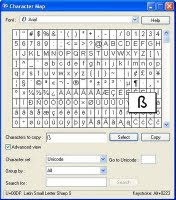
Do not forget to mencentangi "Advanced View".
Third, select the characters / letters (or it could be a combination of several characters / letters) is desired and then click the button "Select" and then click the button "Copy".
Fourth, then switch to facebook page we've opened previously and pastekan at the desired place, such as walls, profiles, and others.
Fifth, if the character has a keystroke we can do this by pressing alt + a certain number on the Numpad keys.
To find out keystroke of characters we choose, we can see the bottom-right.
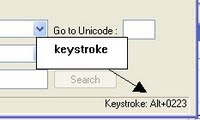 So used to computers for this article, may be useful ....
Good luck!!
How To Make Emoticons Chat On Facebook

Collection of articles this time around again talks about social networking sites and the most popular social current that is Facebook.
There are many applications available to you are taking in the use of this site, one of which is Chat application.
For those of you who like to chat through Facebook, you may not know what a lot Emoticons, emoticons that can be used in Facebook chat.
This script can only be used in the browser Mozilla Mozilla Firefox.
With the add-ons installed Mozilla Firefox and a few scripts from userscript site then we can add a list of Emoticons-emoticons that can be displayed on Facebook chat.
The trick is as follows:
1. Download add-ons for firefox in
https://addons.mozilla.org/en-US/firefox/addon/748
Install the add-ons are in your mozilla firefox.
2. Once installed, restart your mozilla firefox.
3. And then install the script provided by userscript site are:
http://userscripts.org/scripts/show/56504
4. After all is installed, restart your mozilla firefox.
5. Open your Facebook and try to chat with your friend, then automatically display the emoticons will appear on your chat page.
So used to this collection of articles, may be useful ....