Hacking Facebook Password | Facebook Freezer  

Sunday, January 24, 2010

Hacking Facebook Password | Facebook FreezerThis article discusses computer came back on about Facebook. This time the topic is How to Articles Computer Password Hacking Facebook using Facebook Freezer.

Of several ways to do Hacking Facebook; ranging from technical or login page that is by imitating pishing website facebook interface that has been modified so that they can transmit account and password into the web hosting one poster, using the script or by using coarse keyloger or norton antivirus which supports to record keyboard activity, so as to know the user and the user account or a laptop computer, of course without the user realizing it lapotop.

But here Articles Computer just wanted to share a mini tools, which can make owners facebook account password reset.


Hacking Facebook Password | Facebook Freezer
It's easy, because it's so easy anyone can use it, and as far as Computer article yet there are ways to overcome it (the impact of this application), [maybe later ..].

You simply enter your email address victims (your email address to login to Facebook.com ) and press the Freeze. Wait a few moments to process his progress to 100% and please see the results.

Hacking Facebook Password | Facebook Freezer

To get his tools please Download [here]

AddThis Social Bookmark Button


Password Hacking Facebook  

Password Hacking FacebookThis article discusses computer came back on about Facebook. This time the topic is How to Articles Computer Password Hacking Facebook. [Att: "This topic just mere Education; all the consequences that happen to be the responsibility of each yes ..." ]

User ID (Username) and Password is a tool that identification is very urgent for an account. If the User ID (username) and password to an account falls into unauthorized hands it could have been the things that are not in want. This topic was published with the aim of the Netter (Facebook-er) is more careful about access to the account you have.

Here's how that can be done by anyone to try to find a password that Facebook Facebook-er have, is to open the typed password is usually converted into a round symbol or the stars. This can run smoothly on Facebook-er who fails to open with the status facebooknya remember, when Facebook opened automatically re-display the User ID (username) and passwornya. So under these conditions was the password in the form of symbol can appear in ASCI characters or letters or numbers.

Password Hacking Facebook

How to do is to enter a script created with Javascript to Address bar of your browser and do not use the enter key. But click the arrows at the end of the browser, wait a while then will appear a popup that contains the password you are looking for.

Attention:
"It can also be done to see the password email"

To get his script please Download [here]

AddThis Social Bookmark Button


How to Change Address Username Facebook  

How to Change Address Username Facebook

FaceBook is more ngetrend in Indonesia today, but we feel hard to memorize the default username provided by MySpace itself is too long due to dihapalkan / remember.

Okay .. we go straight to the point of changing your MySpace username address, at length previously (hard to promote to others) Being short FaceBook address, which you can easily have you know to your friends.

The way that can be done to change the address your facebook username is as follows:

1. Please visit http://www.facebook.com/username

2. Then came a page that asks you to enter your email and password your facebook account


3. After you log in by entering your email address and password, then in Section 3 of this you are asked to select one of your facebook username address, or you can also select their own addresses through the box that says (Enter desired username).


Description: If you select the "Enter desired username", then you must check the availability of the username through the "Check availability", if the username you entered is not available, then you should choose another name, and if the username you choose is available , it will come out "Confirm" to ensure that the username you chose.


4. If step 1 through 3 have you done correctly, the result facebook address your username will be: http://facebook.com/usernameanda


Good try ....

AddThis Social Bookmark Button


How to Writing Special Blonde On Facebook  

How to Writing Special Blonde On Facebook

Many people have been known social networking sites and the most popular social today are: [Facebook] but not many who do know the special symbols that can be used to express a special message on the facebook is.

Special symbols can not be done by ordinary typing. If interested please follow the way of the following Computer article.

The following way:

First, which of course we have to open the first Facebook page.

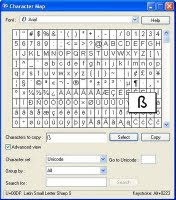
Second, Please to activate the Character Map by clicking Start>> Run>> then type "charmap" (without quotes) and press the ENTER key or click the OK button will appear to the "Character Map", as shown below .


How to Writing Special Blonde On Facebook
Do not forget to mencentangi "Advanced View".

Third, select the characters / letters (or it could be a combination of several characters / letters) is desired and then click the button "Select" and then click the button "Copy".

Fourth, then switch to facebook page we've opened previously and pastekan at the desired place, such as walls, profiles, and others.

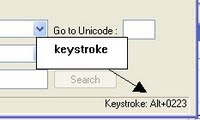
Fifth, if the character has a keystroke we can do this by pressing alt + a certain number on the Numpad keys.

To find out keystroke of characters we choose, we can see the bottom-right.


How to Writing Special Blonde On FacebookSo used to computers for this article, may be useful ....

Good luck!!

AddThis Social Bookmark Button


How To Make Emoticons Chat On Facebook  

How To Make Emoticons Chat On Facebook

Collection of articles this time around again talks about social networking sites and the most popular social current that is Facebook.

There are many applications available to you are taking in the use of this site, one of which is Chat application.


For those of you who like to chat through Facebook, you may not know what a lot Emoticons, emoticons that can be used in Facebook chat.

This script can only be used in the browser Mozilla Mozilla Firefox.

With the add-ons installed Mozilla Firefox and a few scripts from userscript site then we can add a list of Emoticons-emoticons that can be displayed on Facebook chat.

The trick is as follows:

1. Download add-ons for firefox in
https://addons.mozilla.org/en-US/firefox/addon/748

Install the add-ons are in your mozilla firefox.

2. Once installed, restart your mozilla firefox.

3. And then install the script provided by userscript site are:
http://userscripts.org/scripts/show/56504

4. After all is installed, restart your mozilla firefox.

5. Open your Facebook and try to chat with your friend, then automatically display the emoticons will appear on your chat page.

So used to this collection of articles, may be useful ....

AddThis Social Bookmark Button


Google Banned check  

Wednesday, January 6, 2010

You want to know your domain name or web blog / blogger etc.. What is still not yet or already indexed by Google.com is her address. http://www.scripts4seo.com/demos/S4SGoogleBannedCheck/ And also you will know, your domain name or web blog / blogger, what's forbidden or not by adsense.com

AddThis Social Bookmark Button


Between Google and Us  

Friday, January 1, 2010

Between Google and Us

Google, hmm ... yg search engine user-friendly, great at displaying unlimited servings of information to find solutions and innovations. Maybe if Google is not present, many Internet users in circles with no destination in mind. In this case, rather than exclusion of other search engines such as Yahoo, MSN, etc..

We, quite frankly raised by Google, Thank you Google!
Not rule out other SE.

AddThis Social Bookmark Button


Google Chrome (BETA) untuk Windows  

Google Chrome (BETA) untuk Windows

Google Chrome

Google Chrome, the new browser released by Google Inc..
Company search giant is making the browser super fast, faster than Firefox. Loading a light and mild. If you love to browse should try this Chrome browser.

Browser magic with minimalist design, but unfortunately Google does not include the Google Toolbar in your browser Chromenya. (Find the Google toolbar for Chrome) Want to download now? Click here

AddThis Social Bookmark Button


Google Talk Translation Bot  

Google Talk Translation Bott

Google Talk launched two dozen of translation bots yesterday that you add to your Google Talk contact list and use them to translate between languages on the fly. For example, the translation bot de2en@bot.talk.google.com is German to English, and en2fr@bot.talk.google.com will translate English inputs into French. You can find a list of 24 language pairs that the bots support on Google Operating System.

Comparing to Google Translate, this feature is really wonderful when you need to translate a lot of vocabularies. The downside is that you will need to add a lot of these bots to your contact list if you need to translate between several languages. A better approach, in my opinion, is that they should identify the input languages, like this Language Identifier on Xerox’s website. Don’t get me wrong, it’s great, but there are always room for improvement.

AddThis Social Bookmark Button


Unofficial Google Translate API  

Unofficial Google Translate APIGoogle Translate

The other day Philipp Lenssen predicted that Google will have an API for Google Translate by 2009. “[Spanish of this blog was] automatically translated with the terrific Google Translation API. Several native speakers/ readers have told me the translations are absolutely fluent, except for the occasional weirdness due to cultural differences, or some very rare grammar hiccups.” he said.

I think that creating a Google Translate API would not just be cool, but extremely useful. Two days later, I start coding, clackety-clack, clackety-clack… Here I present you the beta version of the uOGT API, short for unOfficial Google Translate API.

Unlike others, uOGT allows users to translate selections of text by including them in a SPAN tag and with class “t”. For example,something to translate. Of course, like most of Google’s web APIs(though this is unofficial), this one requires you to include a JavaScript file to the pages that you want to translate as well(you will also need to upload a server-side file). So is it going to take longer to download the pages that included with the JS file? No, it won’t, because the file is so small - less than 800 bytes, in my example’s setting… (Google’s homepage is 10,000 bytes as today, including images)

To run uOGT, your server needs to have PHP version >=4.3 or 5 installed. The client-side script will work on most of the modern browsers(Firefox, Opera, etc…), except Internet Explorer(I am NOT anti-IE, I don’t know why it doesn’t work… I am working to resolve this issue).

You can download the file here[zip]. After extracting the files on the computer, you can edit the value of LP and URL in file “api.js”: LP is the language pairs to be translate, and the URL property should be the relative URL(which works better) for the server-side file, “translation.php”. Upload all the files, and run “example.html” in a browser, such as Firefox.

You can find a demonstration on the project page, as well as a simple example. This is pretty much it… Tell me what you think. :D

[inspiration and the image from Google Blogoscoped, Google logo is a trademark of Google, Inc]

UPDATE: The development of this project is no longer active, if anyone wants to continue the development, let me know.

UPDATE 2: There’s an official Translate API, but with a lot of restrictions. Also, Amos Vryhof is now responsible for the development of this unofficial API. You can find the latest fix on Google Code. Thanks Amos. :)

AddThis Social Bookmark Button


Search Results without Borders  

Search Results without Borders

Don’t speak Spanish but looking for search results in Spanish? No problem, go to Google Translate, translate the query, and go back to Google and do the search. Hmm, do you notice that there are a lot of back and forth going on? Now, with the new feature on Google Translate, you can do it in less steps.

Go to Google Translate, click on the Search Results tab, type in your query and choose your language and the language you want the results to be in… Err, it’s probably just as much as complicated with the long URL it has. Anyways, with this new feature, you can see the results of the original language and the translated version juxtaposed against each other on the same page for comparing. It’s not a bad way to learn a new language*. :)

*quotes Google: While machine translation is not perfect, it’s usually good enough for you to obtain the gist of information in a language you might otherwise be unable to access.

AddThis Social Bookmark Button


Google  

 Antara Google dan Kami2834153246_ac838cd2d8_m Google Chrome (BETA) untuk Windowshttp://www.google.com/intl/en_ALL/images/logo.gif

AddThis Social Bookmark Button


Machine Translations and Google  

Incredibly, Google also has a dictionary, too .. Which means we do not have to search-translation in a general dictionary, but Google also provides a dictionary in the world. "GOOGLE TRANSLATION"

Machine Translations and Google

See Ian images Machine Translations and Google is.

Machine Translations and GoogleMachine Translations and Google


Machine Translations, and Google has been a new change. Machine Translations and now Google is even better.

Google Translate

Machine Translations and Google

Have the ability to translate not only a word or phrase. But also to translate the entire content of the website into several languages with almost perfect accuracy. Unfortunately, the Indonesian language has not entered in it. Click here to go to Google Translate.

Google Translate” has been in beta for a number of years now. Before Google’s free tool, many users turned to Babelfish at Altavista (now Yahoo) for their translation needs, but Google has clearly taken the lead.

Google Translate currently offers 54 languages that you can translate to and from, and from what I’ve seen, the more content you provide, the better the integrity of the translation itself. Unlike other machine translation systems, Google doesn’t offer multiple language dictionaries like other systems do. This is a good thing as its sometimes difficult to know which dictionary to choose when requesting translations.

Machine translations are no substitute for human translations – yet. The systems are still maturing, though we’ve seen marked improvements over the past 5 years. In my personal experience with machine translations, Google does come up as the winner. Google’s behind-the-scenes “magic” is truly the way in which it does the translation – statistical analysis. You see, Google has a massive database of information (as if you didn’t already know this), and they use statistical learning to guide the accuracy of translations over time. I.e. the more we feed to Google Translate, the better translations will be overall.

Today, Google announced their upcoming web OS, called “Google Chrome OS.” We’re still almost a year away from its release, but it will be very interesting to see how they integrate their machine translations into the OS itself – or if they even attempt it on their first release.

When having casual online dialogue (email, chat, etc), Google Translate can be a great tool to facilitate easy translations. However, for deep translations of documents, web sites, etc – human translators are still the strategic direction to head in.

Machine Translations and Google

AddThis Social Bookmark Button


Google said it Happy New Year 2010  


Now open those of us also celebrate the new year 2010 it is, but google was also celebrating his landslide turnover in 2010 was a new idea, not great ..

AddThis Social Bookmark Button


Google's Game location to YouTube?  

Google's Game location to YouTube?

Jakarta
- Google sepertinya akan membuat situs YouTube yang dimilikinya menjadi lebih seru. Sebab diprediksi, Google akan menyajikan game-game komputer interaktif dalam layanannya.

Prediksi ini muncul setelah Google mendaftarkan paten aplikasi bernama "Sistem Berbasis Web untuk Generasi Game Interaktif pada Video Digital". Paten ini didaftarkan pada Februari 2009 dan dipublikasikan pada bulan ini.

Google membicarakan tentang teknologi dalam layanannya, seperti text box annotations. Anotasi sendiri sebenarnya sempat tersedia di video YouTube namun tidak berkembang dan tidak didukung komponen interaktif.

Google's Game location to YouTube?

Namun kini anotasi tersebut telah dipermak dan difokuskan pada aspek game. "Anotasi semacam ini bisa dipakai untuk menciptakan game melalui video, seperti sebuah game di mana ketika di-click pada lokasi yang berbeda, ia akan menghasilkan sesuatu yang berbeda pula."

Jika hal ini terealisasi, maka para user yang kreatif akan diberi kesempatan untuk menciptakan sesuatu yang menarik, sebuah permainan interaktif, hanya dengan menggunakan video dan tools yang disediakan YouTube.

Google's Game location to YouTube?

AddThis Social Bookmark Button


Business Online  

Monday, December 21, 2009

http://www.bloghger.com/images/blogger/blogger_250x251.jpg
Business Online

AddThis Social Bookmark Button


Design by Amanda @ Blogger Buster